Storypoint Shuffle v1.1.0 - Now with room plans!
It’s been a while since I added any new features to Storypoint Shuffle, but I’ve finally gotten around to adding a few new things that I hope will both be useful for the users of the app and improve the overall dev experience for me.
Room plans
The main feature of this release is “Room plans”, this allows the person creating the room to provide a list of issues they want to estimate in this planning session and keeps a record of the results that can be downloaded at the end of the session. The idea being that this will allow teams to avoid switching between project management tools and the estimation tool during planning sessions, hopefully making the process smoother.
Getting started with room plans
Room plans are a simple JSON or TOML file that contains a list of issues to be estimated in the session including a name and description for each one, and a field to select the card set used during estimation.
The basic format of these files looks like this:
{ "card_set": "fibonacci", "tickets": [ { "name": "Ticket 1", "description": "This is the first ticket." }, { "name": "Ticket 2", "description": "This is the second ticket." } ]}If you’d prefer to write these in TOML format instead of JSON, that’s also supported and looks like this:
card_set = "fibonacci"
[[tickets]]name = "Ticket 1"description = "This is the first ticket."
[[tickets]]name = "Ticket 2"description = "This is the second ticket."If you prefer the condensed format for TOML arrays instead of tables as per the TOML spec1 that’s also supported.
Using room plans in the app
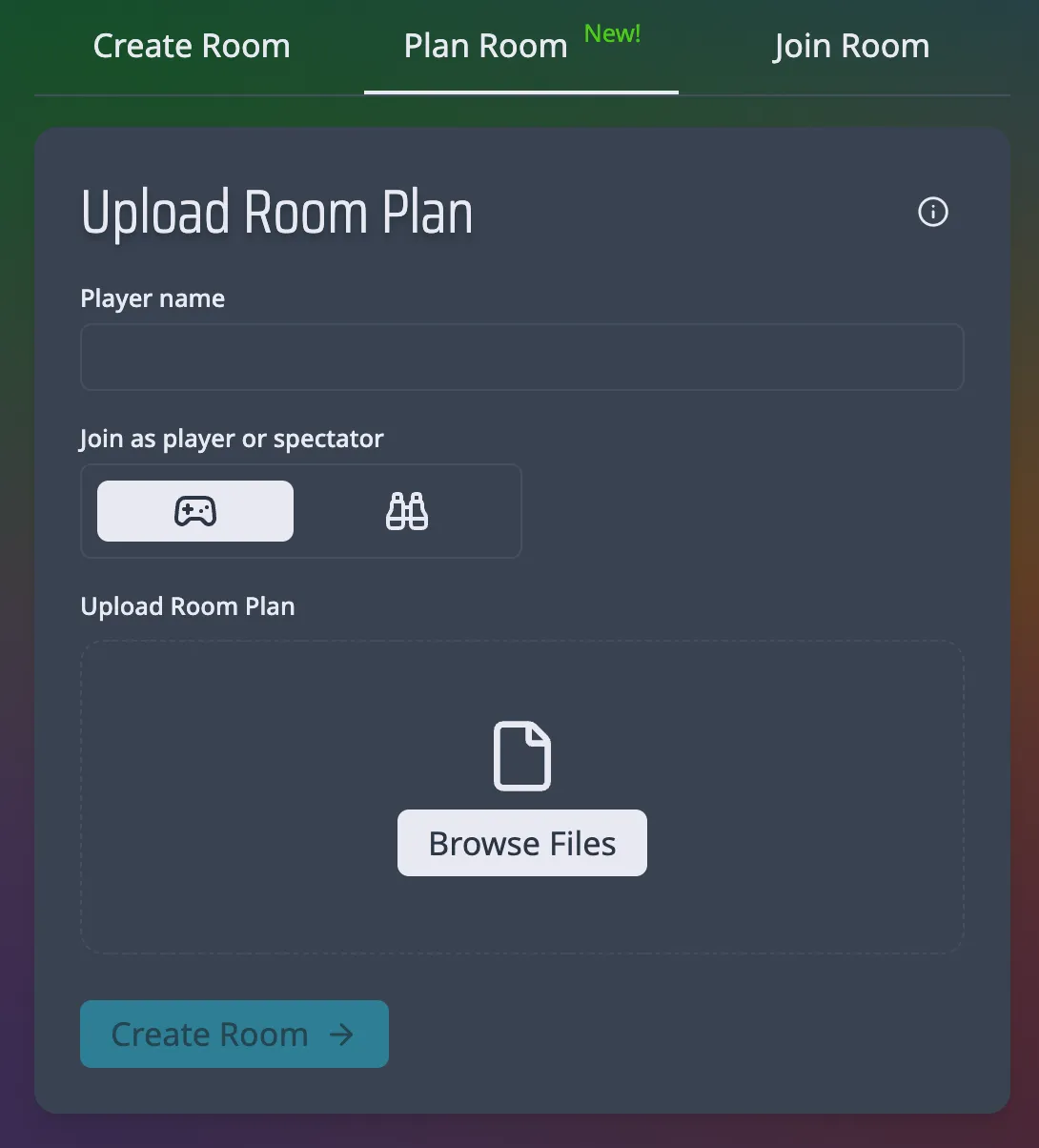
There’s a new tab on the home page “Plan room” here you can enter your name, select player or spectator as your user type, and upload your room plan file. You can use the browse button or drag and drop your .json or .toml file into the upload area to select your room plan file.
Once in the room, you’ll see the name of the current ticket being estimated in the central card, as well as a button to open the ticket list which will show the name, description, and vote estimation for each ticket in the plan. At the end of each voting round, when the board is refreshed the current ticket will be given its selected points value and the next ticket in the plan will be selected for estimation.
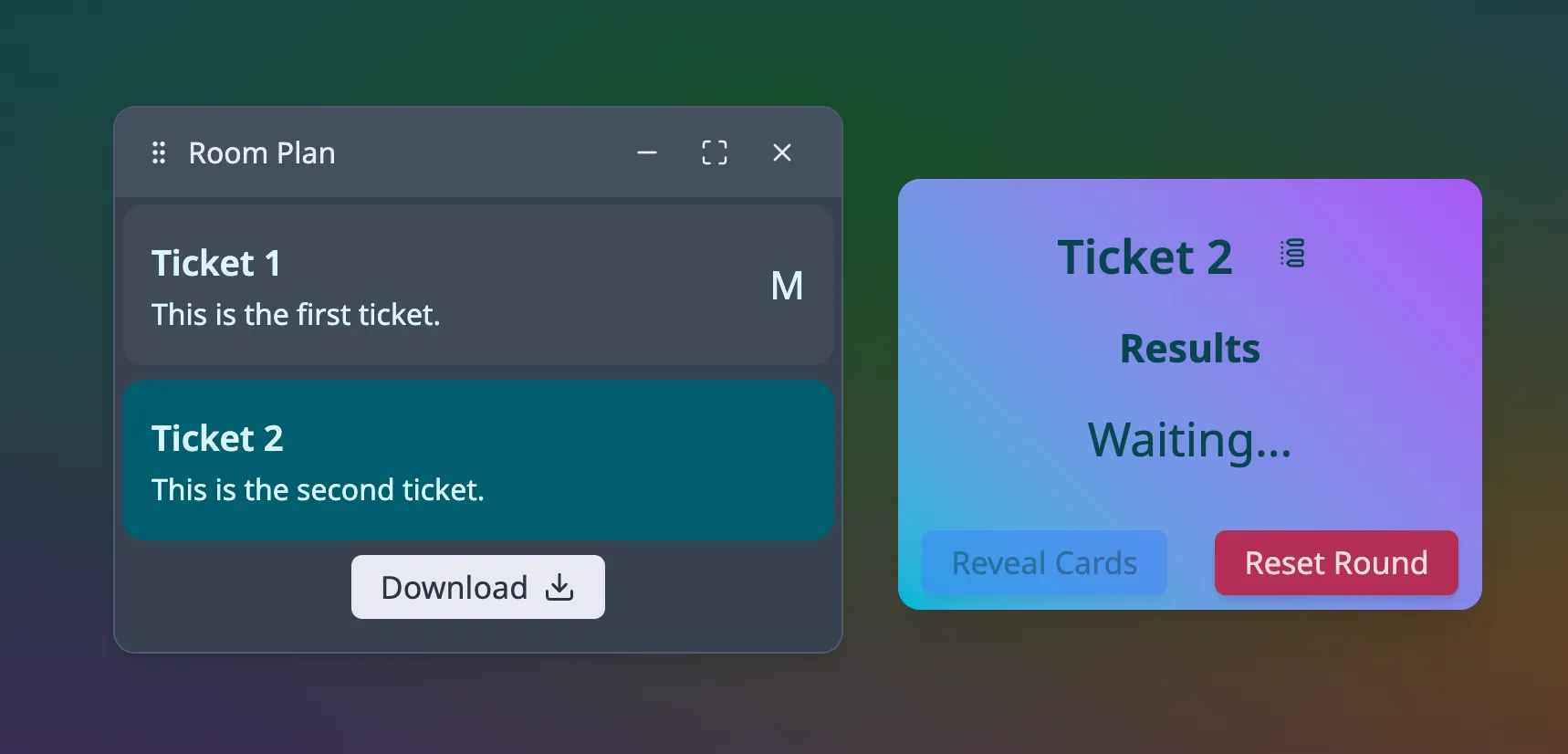
At the bottom of the ticket list there’s a button to download the results of the session, this will download a JSON, TOML, or CSVfile with the name of each ticket and the points value selected for it during the session. This allows you to keep a record of the estimation results for each ticket and refer to this when updating your project management tool after the session.
This feature is still in the early stages of development and while I’ve done my best to test it all, please report any issues or recommendations you have for future updates to the apps Github repo
New dev tooling, Vite+
Vite+ helps to streamline the development process by providing a set of tools and features that make it easier to build and maintain the app. Centralising the tools used for development under a single vp command makes it easier to manage the development environment and ensures that everyone working on the project is using the same tools and configurations.
Vite+ also provides new modern tools for various tasks using the Oxc toolset created by the Void0 team, these include:
- Oxlint2: A linter for JavaScript and TypeScript that provides fast and accurate linting with support for custom rules and configurations. This replaces esLint and provides a much faster linting experience while maintaining the majority (~90%) of the same rules and configurations. As well as support for importing eslint plugins where needed.
- Oxfmt3: A code formatter for JavaScript and TypeScript that provides consistent and customizable formatting with support for various coding styles. This replaces Prettier.
- Rolldown4: A web application bundler that provides fast and efficient bundling with support for code splitting and tree shaking.
Vite+ consolidates these tools under a single command, so instead of having to learn a bunch of separate ones you have vp.
# Package management commandsvp install # Install dependenciesvp add # Add new packagevp remove # Remove packagevp update # Update dependencies
# Development commandsvp dev # Start development server using Vitevp build # Build the appvp check # Combines formatting, linting and type checking # (can also be run individually if needed)vp run # Run a custom script from your package.jsonThe package management commands are a wrapper around your preferred manager, currently supporting npm, pnpm, yarn, and bun. I personally prefer bun but the choice is yours.
The update process
Given the frontend app was already using Vite v7 the update process was fairly straightforward, Vite+ provides an auto-migration tool that did most of the work for me, the only issue being that the migrator expects you to be on Vite v8, so I had to first perform that upgrade manually before running it.
Most of my existing build and linting settings were defaults in the new setup so I didn’t have to make any major changes to the configuration outside of removing the prettier and eslint configs. For the 3rd party eslint plugins all that was requires was to add in plugins to the vite.config.ts
export default defineConfig({ fmt: { ignorePatterns: ["*.gen.ts"], }, lint: { jsPlugins: ["eslint-plugin-storybook", "eslint-plugin-react-refresh"], options: { typeAware: true, typeCheck: true }, ignorePatterns: ["*.gen.ts", "**/.storybook/*"], }, plugins, build: { outDir: "../dist", emptyOutDir: true, },});Speed up
Vite+ and it’s associated tools are designed to be much faster than the ones they replace, mainly eslint and rollup. Given this project is fairly small the speed increase isn’t huge, the old rollup build took around 3.8s vs the 1.8s with rolldown. Bundle size difference is a little more hard to judge, while I added a new package shiki and smol-toml packages for the room plan feature, the overall bundle size doesn’t seem to have changed dramatically.
Overall I really like the way Vite+ has tried to streamline and simplify the development process, not having to remember different script commands, package managers, and lint/formatting configs across different projects is a nice improvement to the developer experience, and it’s definitely something I’ll be looking to add to my other frontend projects.